
Odia (Oriya) Notepad4.5 - Get APK
You'll be able to download in few seconds.
Publisher Description
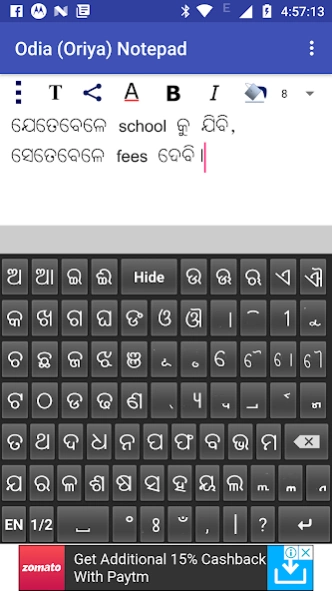

Odia (Oriya) Editor – Write, Send and Share in Odia (Oriya)
You can write, save, share and send Odia ( Oriya ) text using Odia Notepad ( Oriya Notepad ). It is an Oriya Text Editor ( Odia Text Editor ) providing facility to write, save and share in Oriya (Odia).
It is very helpful for Oriya (Odia) people staying inside and outside Odisha ( Orissa ). You can write in Odia (Oriya), send Odia ( Oriya ) SMS, and share Odia (Oriya) texts in both text and image form.
This application contain Oriya keyboard (Odia keyboard) containing Odia ( Oriya ) Varnamala, Matras (Phalas), Yuktaksharas, Numbers and essential symbols.
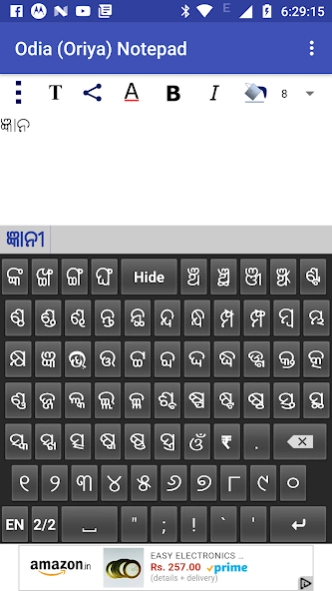
The Oriya keypad (Odia keypad) has two Oriya keyboards- one containing Oriya Varnamalas and Matras and other containing Oriya Yuktaksharas, numbers and symbols. It also contains one English keyboard. Thus it covers almost all of the characters used by a Odia (Oriya) characters.
Select a portion of the text by dragging the finger over the desired portion.
You can apply different text properties such as text color, text size, bold, italic and text background colors to the selected text by clicking the buttons provided at the top.
By pressing the common button at the top left corner (3 vertical dots), multiple options such as 'pre-written texts', 'copy selected text', 'copy all text', 'paste text' and 'delete file'. Do copy and paste by selecting corresponding options.
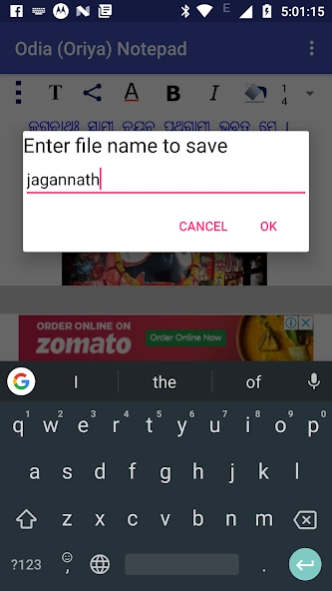
You can save the current document by clicking the 'save file' option of the common menu.
Open a saved document by clicking the 'open file' option of the common menu.
Delete a saved document by clicking the 'delete file' option of the common menu.
There are pre-written texts available, which can be used by selecting them. Press the common button at the top left corner (button with 3 vertical dots) and click 'pre-written texts' menu. Select the category from the list appears. Then select the required message from the next screen. After selection of the message, the message will appear on the notepad area.
Since there is a possibility of Odia (Oriya) fonts not supported in certain applications and certain devices, options for sending and sharing the Odia (Oriya) Text Content as image is provided here.
You can send/share the content through available applications for sending/sharing such as SMS/MMS, Email, Facebook, Twitter, Google plus, Whats App etc by clicking 'share' button at the top. After clicking this button you will be asked whether to send as text or image through a pop-up menu. If you chose 'as text' option, then only the text content will be shared. In case of 'as image' option, the content will be converted to JPEG image and will be shared. Please not that when only the text content is sent, the rendering correctness of the content will depends upon the receiving device and application.
You can send/share the content in the form of a PDF file as well, for Android Kitkat and above.
You can add background image, move and resize it using finger gestures. The button with 'T' at the top is provided for switching between text and image editing modes. You can move and resize the background image when you are in the image mode (the 'T' button gets toggled to an image icon).
While in the text mode, by clicking the writing area (below the buttons at the top) keyboard will appear. By clicking outside the writing area, the keyboard will be hidden. You can explicitly hide the keyboard by clicking the 'Hide' key in the keyboard.
Auto prediction feature is also provided. As you go on typing, the probable words will be suggested by the app through an window just above the keyboard. If you want to select an word from the suggested word, just tap on that word there. The app will also learn new words you type. As and when you go on using the application, it will suggest the most frequently used words first in the list of suggested words.
May Lord Jagannath help to bring out more such Odia (Oriya) applications !
About Odia (Oriya) Notepad
The company that develops Odia (Oriya) Notepad is Braingen Apps. The latest version released by its developer is 4.5.
To install Odia (Oriya) Notepad on your Android device, just click the green Continue To App button above to start the installation process. The app is listed on our website since 2020-02-20 and was downloaded 0 times. We have already checked if the download link is safe, however for your own protection we recommend that you scan the downloaded app with your antivirus. Your antivirus may detect the Odia (Oriya) Notepad as malware as malware if the download link to com.braingen.odianotepad is broken.
How to install Odia (Oriya) Notepad on your Android device:
- Click on the Continue To App button on our website. This will redirect you to Google Play.
- Once the Odia (Oriya) Notepad is shown in the Google Play listing of your Android device, you can start its download and installation. Tap on the Install button located below the search bar and to the right of the app icon.
- A pop-up window with the permissions required by Odia (Oriya) Notepad will be shown. Click on Accept to continue the process.
- Odia (Oriya) Notepad will be downloaded onto your device, displaying a progress. Once the download completes, the installation will start and you'll get a notification after the installation is finished.
Program Details
System requirements
Download information
Pricing
Version History
version 4.5
posted on 2020-02-21
1. Fixed few issues.
2. Added GDPR compliance.
3. Added feature to prompt the user when a new update is available.
version 4.4
posted on 2018-10-28
1. Included Privacy Policy.
2. Made the target SDK to be SDK 28 (i.e. Android 9).
version 2.0
posted on 2016-09-24
Added feature to share the document as PDF. It is applicable for the devices Android Kitkat and above.
version 1.9
posted on 2015-12-30
Removed the ads coming at the beginning.
Disclaimer
External Download
We do not host Odia (Oriya) Notepad on our servers. We did not scan it for viruses, adware, spyware or other type of malware. This app is hosted by Galad and passed their terms and conditions to be listed there. We recommend caution when installing it.
The APK Download link for Odia (Oriya) Notepad is provided to you by apps112.com without any warranties, representations or guarantees of any kind, so access it at your own risk.
If you have questions regarding this particular app contact the publisher directly. For questions about the functionalities of apps112.com contact us.
